Engineered systems for a more resilient tomorrow

The fastest path
from prototype
to fleet operations.

Loop Core brings requirements, design, configurations and test evidence into one living engineering model. Your teams and AI work from the same context as the system evolves.

The problem

Scaling mission-critical systems is hard.

“If I change this part, what do I have to test again?” In a prototype team, someone in the room knows. They designed it, built it and tested it.

At scale nobody in the room knows. R&D is on V3, production builds V2, operations supports V1, and the answer is spread across documents, spreadsheets and people who have moved on. Teams either re-test everything or take a risk.

The organization

More people and handovers

More disciplines and suppliers, and more handovers between them.

The product

More generations at once

More requirements, interfaces and variants, with several generations in service together.

The fleet

More units in more conditions

More operating conditions, incidents and customer obligations, across mixed configurations.

You need an engineering intelligence layer that spans the full mission lifecycle and learns with your team.

Engineering intelligence

One living model.
Every team connected.

The Engineering Intelligence Graph connects the system you intend to build, the configurations you build, and the evidence behind them. Open a component, requirement or test to see its relationships and sources.

Loop Core

Assess changesCoordinate teamsVerify & hand over

Engineering Intelligence

Configuration-aware, traceable, evolving
Engineering modelRequirements, interfaces and system relationships
Programme contextConfigurations, changes and verification evidence

Connect your engineering sources

APIs & MCP
  • Requirements
  • Design & code
  • Test data
  • Analyses
  • Telemetry
Your tools stay. The context comes together.

What are we building?

Requirementsrequirements.csv
IDRequirementLimit
REQ-END-01Endurance≥ 15 min
REQ-MASS-01Take-off mass≤ 2.45 kg
REQ-LINK-01Command latency≤ 200 ms
System architecturearchitecture.sysml
part def Drone;
part def Battery;
part px500 : Drone {
  part battery : Battery;
}
ExcelWordGoogle DocsCATIAPolarionAltium

Keep working in your engineering tools. We build the adapters for your sources in the pilot. Every imported value keeps its source and is reviewed before it enters the graph.

Product tour

Engineering context.
Put to work.

Loop Core helps teams understand a change, coordinate the work and check the evidence. Each view draws on the same Engineering Intelligence Graph.

Digital twin of your system.

  1. Digital, physical and test sourcesEvery source sits under what was designed, what was built or what was proved: the same three groups as the trace.
  2. Connect your existing toolsWe connect read-only to the tools your engineers use, simplifying the integration.
  3. Source maps to the engineering graphAny input to the graph is mapped according to the ontology, which keeps the record reliable.
  4. Full traceability of any sourceThe engineering graph keeps every source traceable by its SHA, so engineers can retrieve past snapshots of the graph for troubleshooting and evaluations.
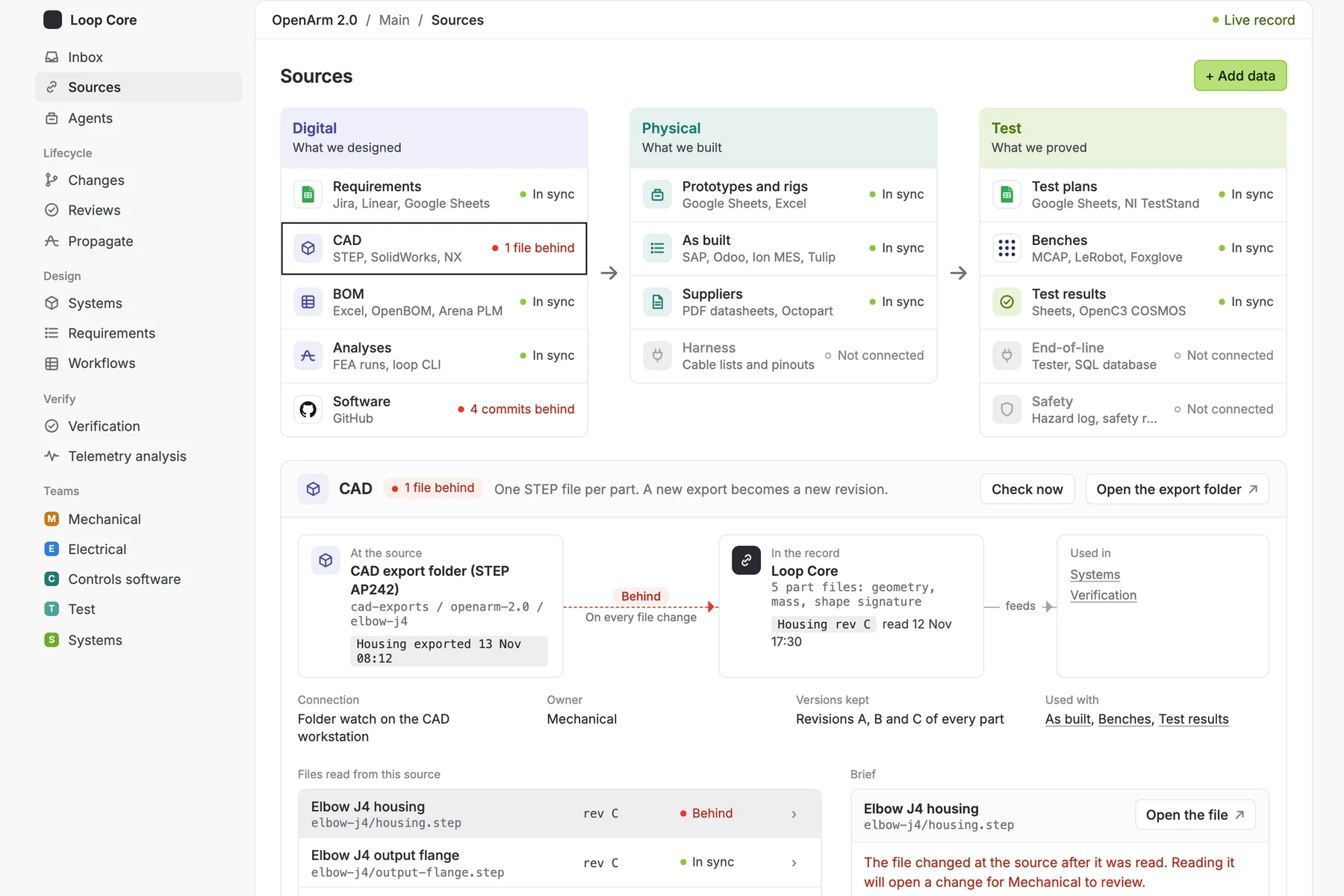
Mockup of the Loop Core Sources page for the OpenArm 2.0 robot arm: sources grouped as Digital, Physical and Test, each with the tools it can come from and whether it is in sync, behind or not connected. CAD is selected and one file behind.1234
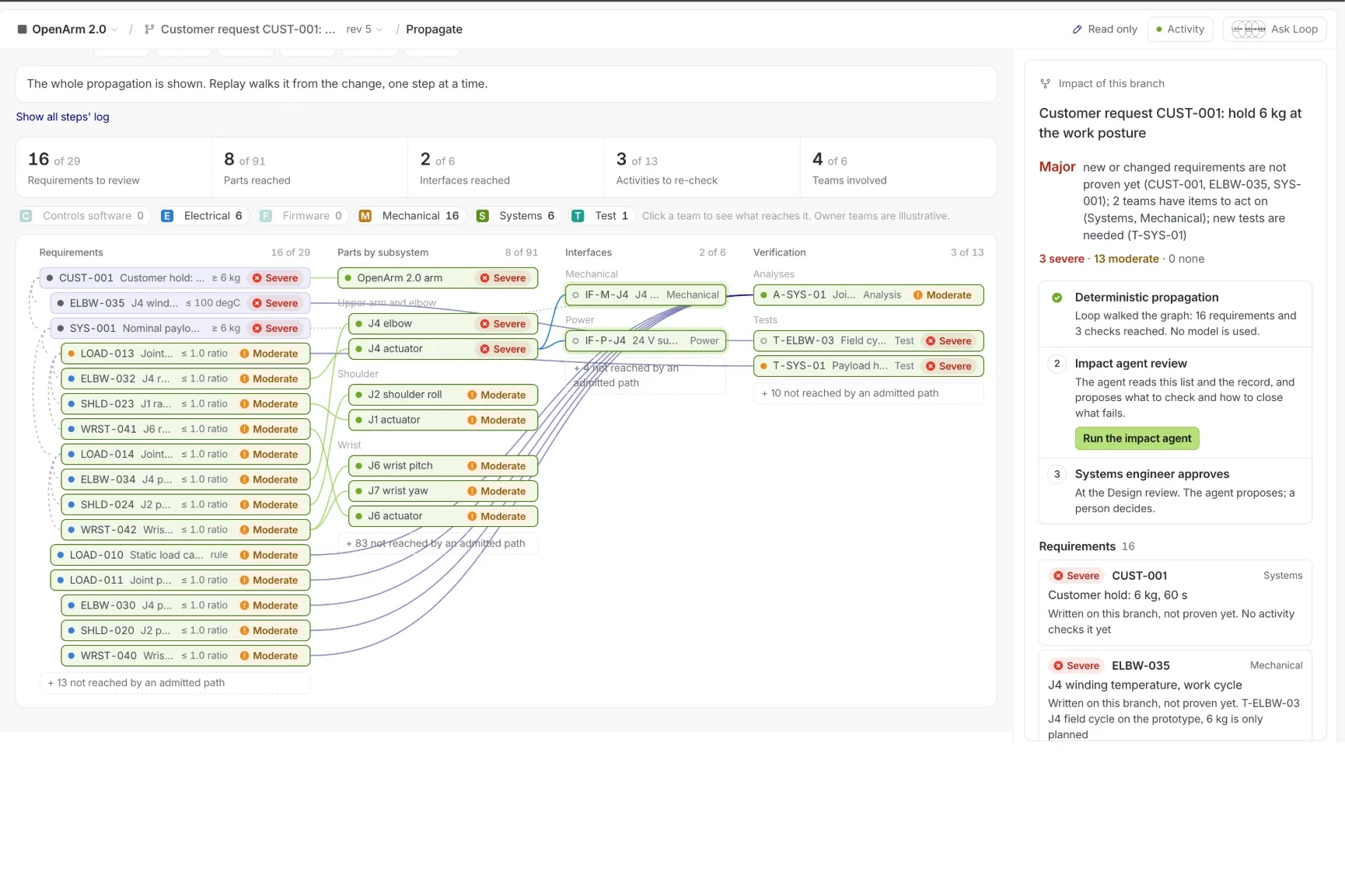
Loop Core Propagate board for a customer request on the OpenArm 2.0 robot arm to hold 6 kg: 16 of 29 requirements to review, 8 of 91 parts reached, 2 of 6 interfaces and 3 of 13 activities to re-check, with the links between them drawn across requirements, parts, interfaces and verification, and the impact panel with the agent review on the right.1234
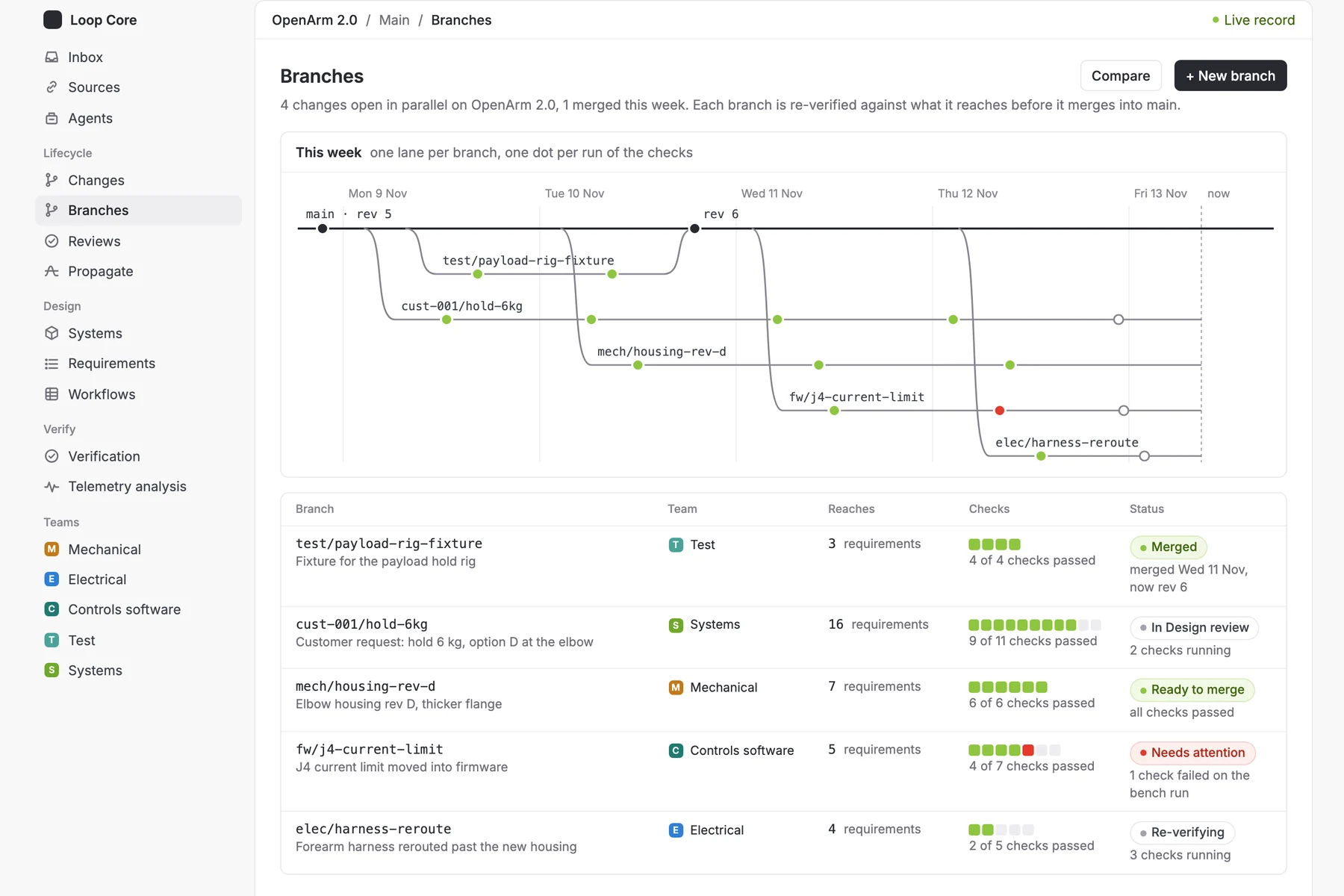
Mockup of a Loop Core Branches page for the OpenArm 2.0 robot arm: one week of main and five team branches, one merged, and a table of what each branch changes, how many requirements it reaches, its checks and its status.1234
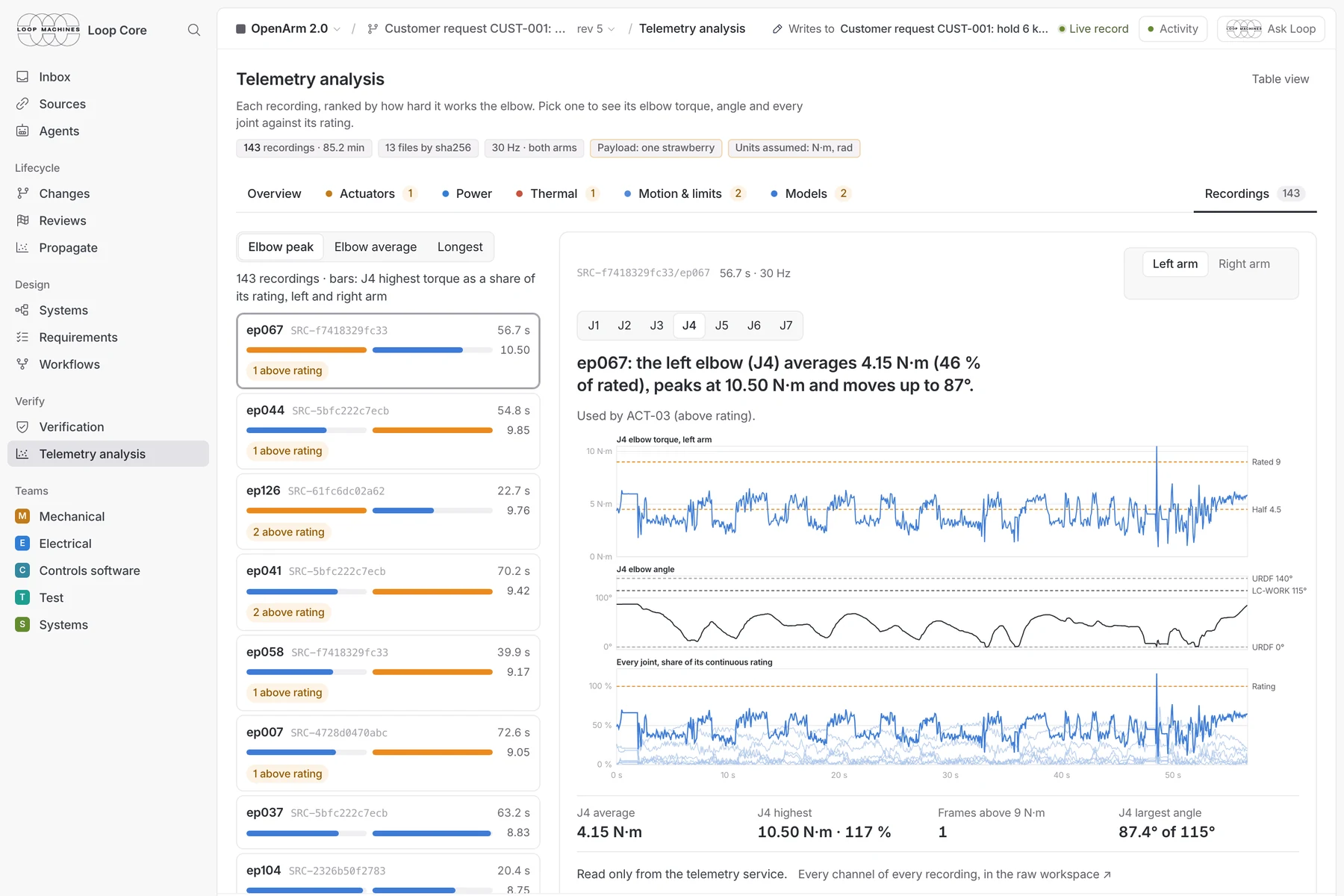
Loop Core Telemetry analysis screen for recording ep067 of an open robot arm: left elbow torque against its 9 N·m rating, elbow angle against the 115° work posture, and every joint against its continuous rating.1234
01 / Sources
Security and ownership

Your data stays in your environment.

Loop runs inside your network. You choose where the model runs, from a frontier API to a fully air-gapped node. The agents and the graph stay the same.

Level 1

Frontier model API

Runs in
OpenAI, Anthropic or Google, in the US or EU
Leaves your network
Task prompts, never used for training
Best for
Non-sensitive work, strongest models
Level 2

EU sovereign hosting

Runs in
A European provider, under EU law only
Leaves your network
Task prompts, under EU jurisdiction
Best for
Teams with EU-only requirements
Level 3

Your private cloud

Runs in
Your cloud account or a sovereign cloud
Leaves your network
Nothing
Best for
Most engineering teams
Level 4

Fully air-gapped

Runs in
Your own servers, no internet
Leaves your network
Nothing. Updates arrive as signed bundles
Best for
Defence and export-controlled work
More control over your data

Your engineering knowledge stays yours.

It grows with every loop, lives in your environment, and stays with you if the software or the model changes.

  • No model is trained on your data
  • Export everything in open formats, any time
  • Deleted when the contract ends
Agent historyEvery draft, approval and correction
Eval setsYour past cases, used to qualify every agent
SkillsProcedures written with your engineers
OntologyHow your engineering is modelled
Engineering graphEvery link between your records, with its source
Your dataRequirements, configurations, tests, telemetry
How we start

Start where the engineering bottleneck matters most.

Start with one engineering decision that takes too long today. Connect the sources it needs, work through it with your team, and measure the difference.

Discover

Find the first loop

Map bottlenecks, systems and decisions. Start with the quick win that pays back most.

Sprint

Build the thread

Build the adapters for the sources that decision needs. Review the baseline with your engineers.

Run

Track outcomes

Measure preparation effort, review time and missed dependencies alongside your current process.

Expand

Add the next loop

Every loop adds context, integrations and decisions, so the next one deploys faster.

Book a demo

Let’s close the loop.

Transparent render of a humanoid robot looking at its hand